Growdoku Garden Logic Puzzle: Rules and Beginner Tips
Learn Growdoku’s seed-placement and matching-root rules, how to narrow down a board, and where to find the official garden logic puzzle for your phone.
By Spare Hours · 4 min read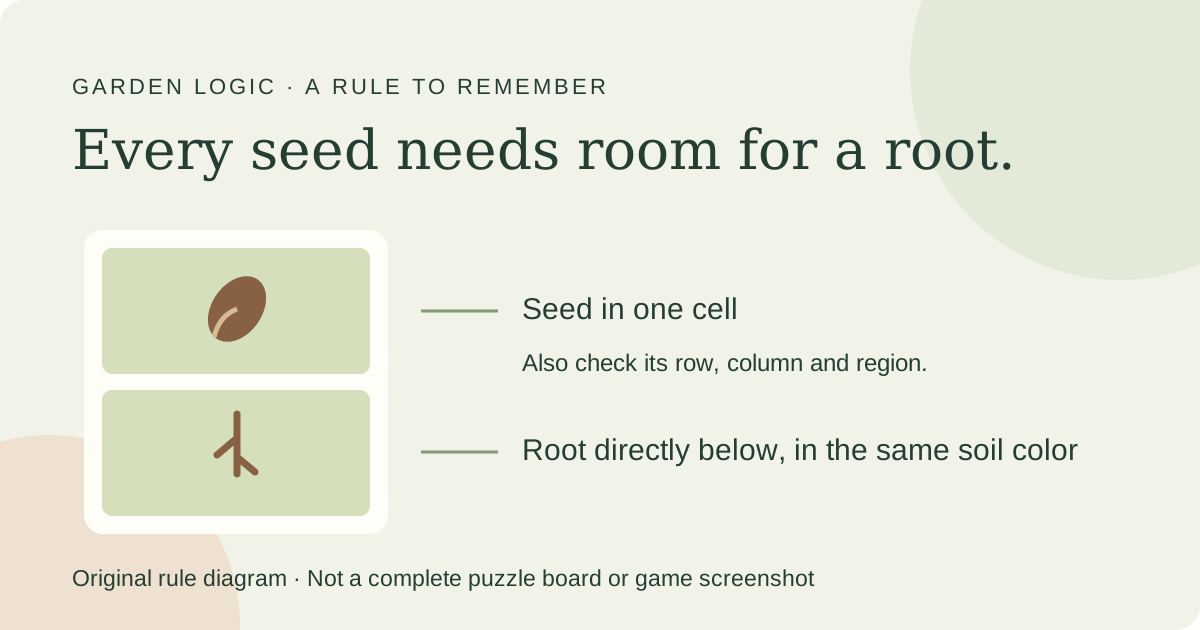
Growdoku is a garden-themed logic puzzle in which you place one seed in every row, column and colored soil region. Each seed also needs a root cell directly below it, and that cell must have the same soil color. The official Growdoku guide describes both parts of the rule.
The garden theme is more than decoration: a placement can meet the row and column restrictions and still fail because its root cannot grow into matching soil. Look for valid seed-and-root pairs before choosing a seed location.
This introduction is based on the developer’s description and the App Store listing, rather than a hands-on review. Sources checked November 4, 2026.
The four checks for a seed placement
Check both the seed’s position and the space underneath it. Growdoku uses Sudoku-style deduction, but you are placing plants instead of filling a grid with digits.
The App Store description listed in our sources confirms the row, column, region and root restrictions. Its description also says there is no timer pressure, so you can study the board at your own pace.
| Check | A valid placement needs |
|---|---|
| Row | Exactly one seed in the row |
| Column | Exactly one seed in the column |
| Soil region | Exactly one seed in the colored region |
| Root | An existing cell directly below the seed, with the same soil color |
Start by ruling out impossible cells
First inspect the cell below each possible seed position. If it is missing or has a different soil color, that seed position cannot satisfy the root rule. Mark impossible spaces using the game’s marker controls.
Then look for a row, column or region with only one possible seed position left. That gives you a placement you can justify. After placing it, review the remaining candidates that share its row, column or region.
Repeat those checks after each decision. This is a starting strategy based on the published rules, not a promise that every later level can be solved with one simple step.
- Check the seed-and-root pair before committing to a square.
- Use the most constrained row, column or region as your next starting point.
- Recheck overlapping restrictions after each placement.
- Use undo or a hint when you cannot explain your next move.
What happens as you complete puzzles?
The official listing describes a campaign of 203 handcrafted puzzles, with gentle introductory boards followed by more demanding layouts. It also describes an infinite mode of generated puzzles after the campaign.
Completing puzzles earns fertilizer for a personal garden. That progression gives the puzzle rounds a gardening setting without turning the activity into a real-world planting tutorial.
The developer’s about page says progress is saved locally on your device. Avoid assuming it transfers between devices; check the current app’s instructions before changing or resetting a device.
Where to get Growdoku
Use the links on the Growdoku website to find its Google Play and Apple App Store listings. The developer names Splitter Studio; Apple lists Levi van Ham as the developer and Splitter Studio in the copyright information.
The Apple listing checked for this guide is free to download and includes advertising and an optional purchase to remove ads. Store prices and compatibility can vary by region, so check the listing on your device.
If you enjoy the garden setting away from the screen, try our windowsill herb guide. For a creative activity with a prepared outline instead of a logic board, browse coloring sheets or try guided coloring in Color Aura.
Common questions
Is Growdoku the same as ordinary Sudoku?
It uses Sudoku-style placement logic, but you place seeds rather than digits. Each row, column and colored region needs one seed, and each seed needs matching soil directly below for its root.
Why is a seed invalid when its row and column look correct?
Check the colored region and the cell below the seed. A root needs an existing cell of the same soil color directly beneath its seed.
Does Growdoku have a timer?
The developer’s description and the App Store listing say there is no timer pressure. Hints, markers and undo controls are also listed.
Sources
- Growdoku: official rules and features, Splitter Studio; checked November 4, 2026
- Apple App Store: Growdoku Garden Logic Puzzle, Rules, campaign, garden progression and purchase information; checked November 4, 2026
A Spare Hours practical guide. How we research and write our guides, including our use of AI tools.
Browse All Guides →